


Create sophisticated Gutenberg blocks directly in PHP using ACF free version, without installing Node.js or complex tools that slow down your development.
This pure PHP approach respects WordPress best practices by using standard block.json configuration, while your ACF field groups automatically transform into native and intuitive Gutenberg controls.
The rendering uses only standard WordPress functions and direct data access, zero dependency on ACF functions like get_field(). Discover how to set up this performant and maintainable system that generates dynamic blocks, fully compatible with the free version of ACF and your WordPress ecosystem, without the unnecessary complexity of JavaScript, React, or external tools. Streamline your workflow and build blocks that scale effortlessly with your content strategy.
Enable the ACF fields to Gutenberg block feature
The free version of ACF is installed and active.
The EAC components plugin is installed and active.
In the dashboard select EAC components link, select the WordPress tab and enable the ACF fields to Gutenberg block option and save settings.
File Structure
You can create the file structure either in your current theme or in an mu-plugin (recommended).
If you want to create multiple blocks, it is best to define a directory (blocks) in which you will include your block directories.
theme
/wp-content/themes/your-theme/
├── functions.php
└── blocks/
    ├── testimonial/
    │   ├── block.json
	│   ├── editor.css
	│   ├── frontend.css
    │   └── render.php
    └── pricing/
        ├── block.json
	    ├── editor.css
	    ├── frontend.css
        └── render.php
...
mu-plugins
/wp-content/plugins/mu-plugins/
├── acf-to-gutenberg.php
└── blocks/
    ├── testimonial/
    │   ├── block.json
	│   ├── editor.css
	│   ├── frontend.css
    │   └── render.php
    └── pricing/
        ├── block.json
	    ├── editor.css
	    ├── frontend.css
        └── render.php
...
Create the block configuration (block.json)
Since WordPress 5.8, it is recommended to register blocks using the block.json file. If you haven’t already done so, create a block.json file in your file structure. This file defines the block’s properties and settings.
Explanation of key properties
apiVersion: set to 3 for WordPress 6.3+ to enable iframe editor support. In WordPress 7.0, version 3 will become mandatory.
name: the block’s unique identifier ‘namespace/block name’ (Mandatory)
title: the block’s display name in the block inserter
category: defines where the block appears in Gutenberg
icon: the WordPress Dashicon representing the block
description: a brief explanation of the block shown in the editor
keywords: list of keywords to find a block
editorStyle: CSS file loaded on the editor. Use the file:./ prefix for relative path
style: CSS file loaded on both the editor and frontend. Use the file:./ prefix for relative path
render: the name of the PHP file for rendering. Use the file:./ prefix for relative path (Mandatory)
supports: controls block settings like alignment, anchor, and HTML editing
Adding undocumented supports could negatively affect the block's behavior and overall functionality. For an optimal user experience, please use only the supports that cover general styles.
{
    "$schema": "https://schemas.wp.org/trunk/block.json",
    "apiVersion": 3,
    "name": "eac-blocks/testimonial",
    "title": "EAC Testimonial",
    "category": "widgets",
    "icon": "awards",
    "description": "Display a customer testimonial with rating",
    "keywords": ["acf", "testimonial", "review", "quote"],
	"textdomain": "eac-components",
	"editorStyle": "file:./editor.css",
	"style": "file:./frontend.css",
	"render": "file:./render.php",
    "supports": {
        "html": false,
		"visibility": true,
		"className": false,
		"color": {
			"background": true,
			"text": true,
			"link": true
		},
		"spacing": {
			"margin": true,
			"padding": true
		},
		"typography": {
			"fontSize": true,
			"textAlign": true
		},
		"shadow": true,
		"__experimentalBorder": {
			"color": true,
			"radius": true,
			"style": true,
			"width": true
		},
		"border": {
			"color": true,
			"radius": true,
			"style": true,
			"width": true
		}
}
Create the initial block rendering (render.php)
If you haven’t already done so, create a render.php file in your file structure. In our case this PHP file will be used to output the block markup.
The get_block_wrapper_attributes function allows you to use the styles built by WordPress native supports for a block, such as background, text colors and font size…
You can add your own class by including the class property as a parameter of the function.
<?php
/**
 * Render callback for Testimonial Block
 *
 * @param array  $attributes The array of attributes for the block
 * @param string $content The markup of the block as stored in the database, if any.
 * @param WP_Block $block The instance of the WP_Block class that represents the rendered block (metadata of the block).
 *
 * @since 1.0.0
 */

defined( 'ABSPATH' ) || exit;

$wrapper_attributes = get_block_wrapper_attributes( array(
	'class' => 'eac-testimonial__block-wrapper',
) );
?>
<article <?php echo wp_kses_data( $wrapper_attributes ); ?>>
	<?php printf( '<div>%s: %s</div>', 'My custom block is now active', esc_html( $block->name ) ); ?>
</article>
<?php
Register your block
After creating the directory structure and populating the block.json and render.php files, you can call the block creation function within your theme or better from an mu-plugin. You can create as many blocks as you wish, provided the structure is respected.
The register_eac_block function expects two parameters
path => the absolute path to the block directory,
name => the block’s namespace/name as specified in the JSON file.
theme
Paste this content at the end of the functions.php file in your theme or child theme.
<?php
...

add_action( 'init', function() {
    // Check function exists.
    if ( function_exists( 'register_eac_block') ) {
        // Register a block testimonial.
        register_eac_block( array(
			'path' => get_stylesheet_directory() . '/blocks/testimonial',
			'name' => 'eac-blocks/testimonial'
        ));

		// Register a block pricing.
        register_eac_block( array(
			'path' => get_stylesheet_directory() . '/blocks/pricing',
			'name' => 'tutorial/smart-pricing'
        ));
    } else {
			error_log( 'The "register_eac_block" function does not exist.' );
	}
}, 100 ); // <== priority
mu-plugins
At the root of the mu-plugins directory, create a PHP file (Ex: acf-to-gutenberg.php) and paste this content, having first made the modifications specific to your own block.
Don’t forget to activate this plugin in the dashboard/plugins
<?php
/**
 * Plugin Name: ACF fields to Gutenberg block
 * Description: Create a Gutenberg block using fields from an ACF group.
 * Version: 1.0.0
 * Author: XXXX
 */

add_action( 'init', function() {
    // Check function exists.
    if ( function_exists( 'register_eac_block') ) {
        // Register a block testimonial.
        register_eac_block( array(
			'path' => __DIR__ . '/blocks/testimonial',
			'name' => 'eac-blocks/testimonial'
        ));

		// Register a block pricing.
        register_eac_block( array(
			'path' => __DIR__ . '/blocks/pricing',
			'name' => 'tutorial/smart-pricing'
        ));
    } else {
			error_log( 'The "register_eac_block" function does not exist.' );
	}
}, 100 ); // <== priority
Insert the block into a publication
Open a post and search for the block name using its title or keywords. Insert it into the preview area.
You should see the block active, as defined in render.php and in the right panel, you will see a notice indicating that there is no ACF group associated with the block name.
You rock.
Now I’m starting to act like AI, offering congratulations and embodying a persona… it’s ridiculous.
Create ACF fields and location rules
ACF fields
After registering your block, you have to create the ACF fields that will be used to generate the corresponding Gutenberg controls.
Create a new field group and field types corresponding to the supported field types presented in the following section.
The name of each field will be used as a block attribute for rendering after conversion to Camel case format.
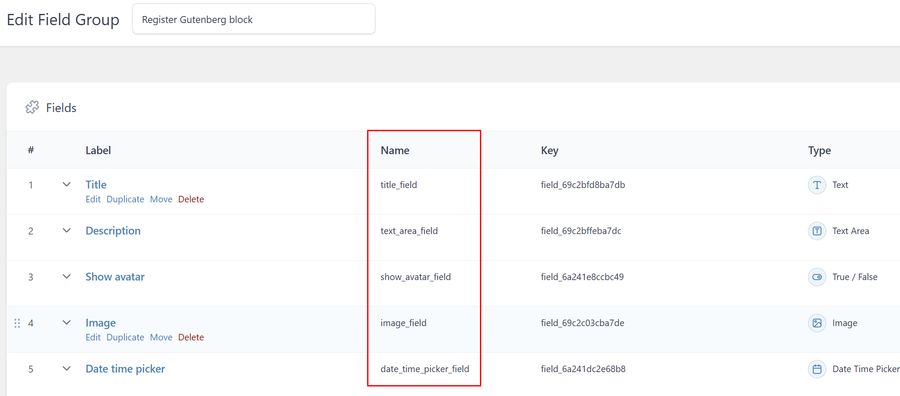
Location rules
In the Show this field group list if Forms/Block (EAC) is equal to and select the block name.

List of currently supported ACF fields
The complete list of currently supported fields. The ACF field type and field properties.
Note that the Instructions property is used for the control’s Help property.
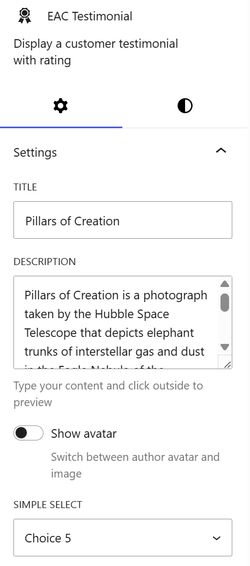
Note that to avoid reloading the block for each character type in the TextArea control, you must click outside the control to see the preview.
Note that the label of each ACF field is used as the control label.
The block attribute type, the type of control used and the section in which it will be included.
| ACF Field type |
Supported Properties |
Block Attribute type |
Block Control type |
Block Section |
|---|---|---|---|---|
| text | Default Value
Instructions |
string | TextControl | Settings |
| textarea | Default Value
Instructions |
string | TextareaControl | Settings |
| number | Default Value
Minimum Maximum Step Instructions |
number | NumberControl | Settings |
| range | Default Value
Minimum Maximum Step Instructions |
number | RangeControl | Settings |
| select | Choices Default Value Instructions |
string | SelectControl | Settings |
| true_false | Default Value Instructions |
boolean | ToggleControl | Settings |
| image | Instructions | object | MediaUpload | Image |
| url | Default Value Instructions |
string | TextControl | link |
| date_time_picker | Display Format Instructions |
string | DateTimePicker | Date |
| page_link | Filter by Post Type Instructions |
string | SelectControl | Link |
| button_group | Choices Default Value Instructions |
string | ToggleGroupControl | Settings |
Block controls distributed by section
The controls in the Settings section
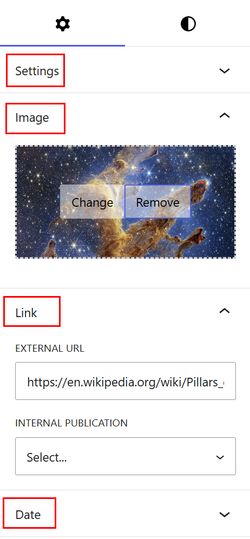
The controls for the Image, Link, and Date sections
Finalize block rendering
For example, the ACF field date_time_picker_field is converted to dateTimePickerField. Therefore, it is this attribute name that will be used for rendering.
A few rules apply: always check if the attribute exists and provide a default value.
Data displayed on the client side must always be escaped.
Escaping output is the process of securing output data by stripping out unwanted data, like malformed HTML or script tags.
For the ACF image field the corresponding attribute is an array containing all the image properties: src, srcset, sizes, width, and height.
<?php
/**
 * Render callback for Testimonial Block
 *
 * @param array  array $attributes The array of attributes for the block
 * @param string string $content The markup of the block as stored in the database, if any.
 * @param array  WP_Block $block The instance of the WP_Block class that represents the rendered block (metadata of the block).
 *
 * @since 1.0.0
 */

defined( 'ABSPATH' ) || exit;

$titre       = isset( $attributes['titleField'] ) ? trim( $attributes['titleField'] ) : '';
$description = isset( $attributes['textAreaField'] ) ? trim( $attributes['textAreaField'] ) : '';
$show_avatar = isset( $attributes['showAvatarField'] ) ? boolval( $attributes['showAvatarField'] ) : false;
$note        = isset( $attributes['noteField'] ) ? absint( $attributes['noteField'] ) : '';
$note        = '' !== $note ? max( 0, min( 5, $note ) ) : '';
$page_link   = isset( $attributes['internalPublicationField'] ) ? $attributes['internalPublicationField'] : '';
$has_image   = isset( $attributes['imageField'] ) && is_array( $attributes['imageField'] ) ? $attributes['imageField'] : array();
$has_url     = isset( $attributes['externalUrlField'] ) ? trim( $attributes['externalUrlField'] ) : '';
$date_time   = isset( $attributes['dateTimePickerField'] ) ? $attributes['dateTimePickerField'] : '';
$review      = isset( $attributes['reviewField'] ) ? absint( $attributes['reviewField'] ) : 19;
$link_label  = isset( $attributes['linkLabelField'] ) ? trim( $attributes['linkLabelField'] ) : '';

// Add your own class to the wrapper
$wrapper_attributes = get_block_wrapper_attributes( array(
	'class' => 'eac-testimonial__block-wrapper',
) );
?>
<article <?php echo wp_kses_data( $wrapper_attributes ); ?>>
	<div class='eac-testimonial__wrapper-image'>
			<?php if ( ! empty( $page_link ) ) : ?>
				<a href='<?php echo esc_url( $page_link ); ?>'>
			<?php endif; ?>

			<?php if ( $show_avatar ) : ?>
				<div class='eac-testimonial__image-avatar'>
					<img alt src="<?php echo esc_url( get_avatar_url( (int) get_the_author_meta( 'ID' ), array( 'size' => 80 ) ) ); ?>" />
				</div>
			<?php elseif ( ! empty( $has_image ) ) :
				$src        = ! empty( $has_image['src'] ) ? $has_image['src'] : '';
				$src_set    = $has_image['srcset'];
				$src_sizes  = $has_image['sizes'];
				$src_width  = $has_image['width'];
				$src_height = $has_image['height'];
				printf( '<img class="eac-testimonial__image-img" alt src="%s" srcset="%s" sizes="%s" width="%s" height="%s" />', esc_url( $src ), esc_attr( $src_set ), esc_attr( $src_sizes ), esc_attr( $src_width ), esc_attr( $src_height ) );
			endif;

			if ( ! empty( $page_link ) ) : ?>
				</a>
			<?php endif; ?>
	</div>
	<div class='eac-testimonial__wrapper-content'>
		<?php if ( $titre ) : ?>
			<h2 class='eac-testimonial__content-text'><?php echo esc_html( $titre ); ?></h2>
		<?php endif; ?>

		<?php if ( $description ) : ?>
			<p class='eac-testimonial__content-area'><?php echo nl2br( esc_html( $description ) ); ?></p>
		<?php endif; ?>

		<?php if ( $date_time ) :
			$timestamp = strtotime( $date_time ); ?>
			<p class='eac-testimonial__content-date'>Photo: <?php echo wp_date( get_option( 'date_format' ), esc_attr( $timestamp ) ); // phpcs:ignore ?></p>
		<?php endif; ?>

		<?php if ( $note ) : ?>
			<p class='eac-testimonial__content-rating' style='color: gold;'>
				<?php echo esc_html( str_repeat( '★', $note ) . str_repeat( '☆', 5 - $note ) ); ?>
				<?php printf( ' / %d reviews', esc_attr( $review ) ); ?>
			</p>
		<?php endif; ?>

		<?php if ( $has_url ) : ?>
			<a href='<?php echo esc_url( $has_url ); ?>'>
				<p class='eac-testimonial__content-reading'><?php echo esc_html( $link_label ); ?></p>
			</a>
		<?php endif; ?>
	</div>
</article>
<?php
Editor and Frontend styles
Editor
In the directory structure you have defined, create a stylesheet file as specified in block.json (“editorStyle”: “file:./editor.css”).
In this file, you need to define the necessary classes to modify the block’s behavior within the editor.
A specific class is automatically generated, consisting of the namespace/block-name followed by ‘-editor-preview’.
For example, for a block named eac-blocks/testimonial, the class: eac-blocks-testimonial-editor-preview is generated.
/** This class is automatically generated with the namespace/name+'-editor-preview' */
.eac-blocks-testimonial-editor-preview {
	padding: 8px 0;
	box-sizing: border-box;
}

/* Disable links in the editor */
.eac-blocks-testimonial-editor-preview a {
	pointer-events: none;
	cursor: default;
	text-decoration: none;
	color: inherit;
}

.eac-date-time-picker-control .components-datetime__time-wrapper .components-base-control:first-of-type {
	margin-block-end: 0;
}

.eac-image-control button.is-primary,
.eac-image-control button.is-secondary {
	background-color: rgba(255, 255, 255, 0.5);
	color: black;
}
Frontend
In the directory structure you have defined, create a stylesheet file as specified in block.json (“style”: “file:./frontend.css”) and apply the styles necessary for rendering.
:root {
	--eac-style-link-color: var(--wp--style--color--link, var(--wp--preset--color--primary, #c00));
	--eac-style-line-height: calc(2px + 2ex + 2px);
}

html[dir="rtl"] .has-text-align-left {
	text-align: start;
}

html[dir="rtl"] .has-text-align-right {
	text-align: end;
}

/** Uncomment to force link color */
div[class*="eac-testimonial__block-"] a {
	/**color: var(--eac-style-link-color);*/
	text-decoration: none;
}

/** clamp - min:14px, vwmin:330px vwmax:1200px, max:17px */
.eac-testimonial__block-wrapper {
	display: flex;
	flex-direction: column;
	font-size: clamp(0.875rem, 0.798rem + 0.353vw, 1.063rem) !important;
}

@media (min-width: 576px) {
	.eac-testimonial__block-wrapper {
		flex-direction: row;
	}
}

.eac-testimonial__wrapper-image,
.eac-testimonial__wrapper-content {
	flex-basis: 50%;
}

.eac-testimonial__wrapper-image {
	display: flex;
	align-items: center;
	justify-content: start;
}

.eac-testimonial__wrapper-image:has(.eac-testimonial__image-avatar) {
	justify-content: center;
}

.eac-testimonial__wrapper-image a {
	display: inline-flex;
}

.eac-testimonial__wrapper-image .eac-testimonial__image-avatar img {
	block-size: auto;
	inline-size: 80px;
	border-radius: 50%;
}

.eac-testimonial__wrapper-image .eac-testimonial__image-img {
	max-inline-size: 100%;
	block-size: auto;
}

.eac-testimonial__wrapper-content {
	padding: 20px;
	line-height: var(--eac-style-line-height);
}

.eac-testimonial__wrapper-content p {
	margin-block: 0 1em;
}

.eac-testimonial__wrapper-content .eac-testimonial__content-text {
	text-align: center;
	font-size: 1.3rem;
	font-weight: 500;
}